

When I officially started freelancing in 2021, I had zero leads, zero contacts, and zero connections. Shortly after, I landed my first two local clients through personal outreach – which was not easy at first. But after a few trial and errors, I figured it out, and will be sharing my five easy ways to find and verify client emails before you send that email.
If you are new to freelancing or looking to get more leads, this article is for you. And if you are a content or UGC creator or influencer looking to snag more brand deals, take the front seat too.
Because whether you are a freelance beginner or seasoned content creator, we can agree that the more clients you land, the louder the cha-ching.
Further reading: How To Find Freelance Clients Fast
But before we continue, let's get two things straight: your potential clients and your proposed services. If these two points are clear to you, it will be easy for you to find and verify client emails. WE’LL DISCUSS:
- Company Website
- Marketplaces and Ecommerce Platforms
- Email Finder tools
- Email Permutator
- Software Marketplaces
- How to Verify Client Emails
- In summary
In my previous post, I shared several ways to find freelance clients fast, and my first point to landing more clients is through cold emailing. If you are a freelancer or content creator, you will understand that to get more leads, you need to contact your prospective clients. And to contact them, you need their emails first.
But you can’t just see a founder’s email on Craigslist like a wanted ad – you have to search and find it. So before you prep that pitch or UGC portfolio, here are my five easy ways to find and verify client emails (to make sure your emails get to the right person):
1. Company Website
When I first started out, the first place I searched for client emails was the company’s website. Not the ‘Contact us’ page!
You will typically find information about the current employees in the employment or career page or if the company has a different section for that. On this page, you will see the employees LinkedIn profiles and email addresses, along with their current roles.
Related article: 7 Ways to Set Boundaries With Your Clients
Depending on the service you are looking to offer, your focus should be to reach out to the Talent Acquisitions Manager, the Team Lead for the role you aspire, or the founder (for small start-ups).
If you are a content creator, look out for the brand’s Press or Affiliates or Creator or Partnership pages on their website. From there, you can fill out a form or find an email address to send your pitch.
From my experience, the company or brand’s website is the quickest way to find client emails or leads for cold emailing.
2. Marketplaces and Ecommerce platforms
A little intro – I’m a technical and customer support specialist, helping ecommerce and SaaS startups manage and set up their customers’ interactions. I landed my first ecommerce client in 2022 via Etsy until she restructured her business. And I have used this method to get short term clients since then.
Etsy and Shopify have been my go-to place to find and verify client emails. Simply go to Etsy, review businesses that may be in your niche, find their contact emails on their profile, and reach out to them.
Do not message the sellers with a pitch! If reported, your account will be disabled – so beware!
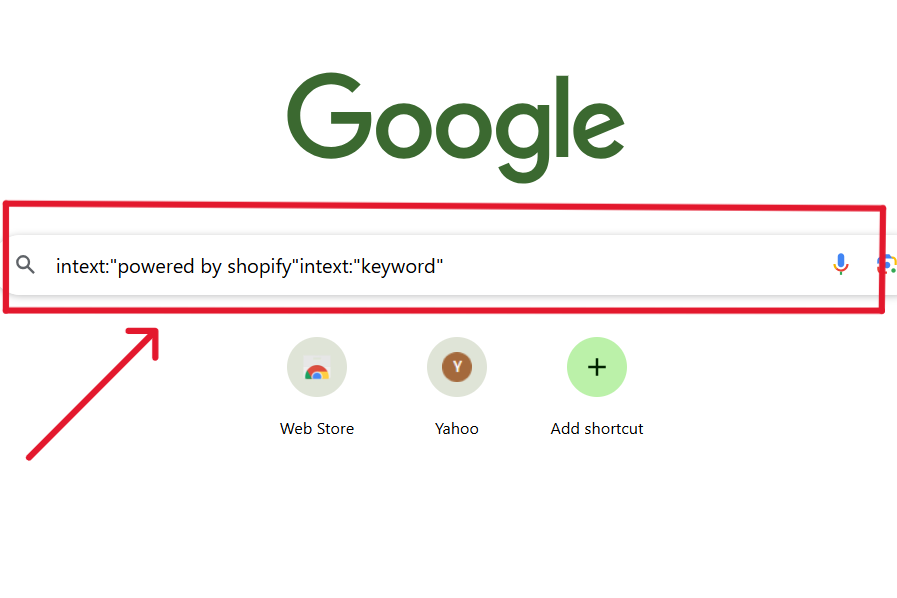
I also use a simple prompt in Google to find prospective Shopify clients that I’d love to work with. On the Google search engine, type in this prompt:
intext:"powered by shopify"intext:"keyword"
“Keyword” signifies the niche you want to work with, example ‘pet store’, ‘beauty’, etc. Once you input this prompt and hit ‘Enter’, a list of Shopify stores will be displayed for you. From here, you can do your thing!
Ecommerce marketplaces have been great avenues to find prospective clients that are within your niche and also helps you understand how to serve them better.
Related article: Freelancing Tips From My Experience
3. Email Finder Tools
Not everyone likes to get a DM on LinkedIn or Instagram, and I understand that. But since I want more clients to pad my portfolio, an email address will be the best means to contact them.
Since these emails are not randomly available on the internet, Email Finder tools have been an effective method to find and verify client emails. Hunter.io is my favourite tool because it finds and verifies the client’s email address at the same time. All you need to do is input their full name and custom domain to get the email address.
Mailmeteor’s Email Finder tool is also a great way to find and verify client emails without breaking the bank. Just input the client’s full name and the company’s or custom domain, and you will get the client’s email address in a few seconds.
Also read: My 5 top cold email tools for freelancers and creators
4. Email Permutator
An Email Permutator is a tool that generates the possible email address combinations of someone based on their full name and custom domain.
Let’s say you have a prospective client in mind, but can’t seem to find a way to reach them. You got crickets the last time you sent them a DM, and now you want to take it further – but you can’t find their email address.
This is where an Email Permutator tool comes in. I use Mailmeteor’s Email Permutator tool to generate possible email addresses for a lead. This tool is free, easy to use, and generates every possible email combination for that client.
Related article: How To Write Cold Emails That Get Clients: Templates + Tips
To find and verify client emails with an Email Permutator, here are two correct methods I use:
a. Generate the client’s email address
In the Email Permutator tool, input the client’s first name, last name, and custom domain of your prospective client. Then click on ‘Generate email addresses”.
The tool then generates all the possible email address combinations for that client on the right side.
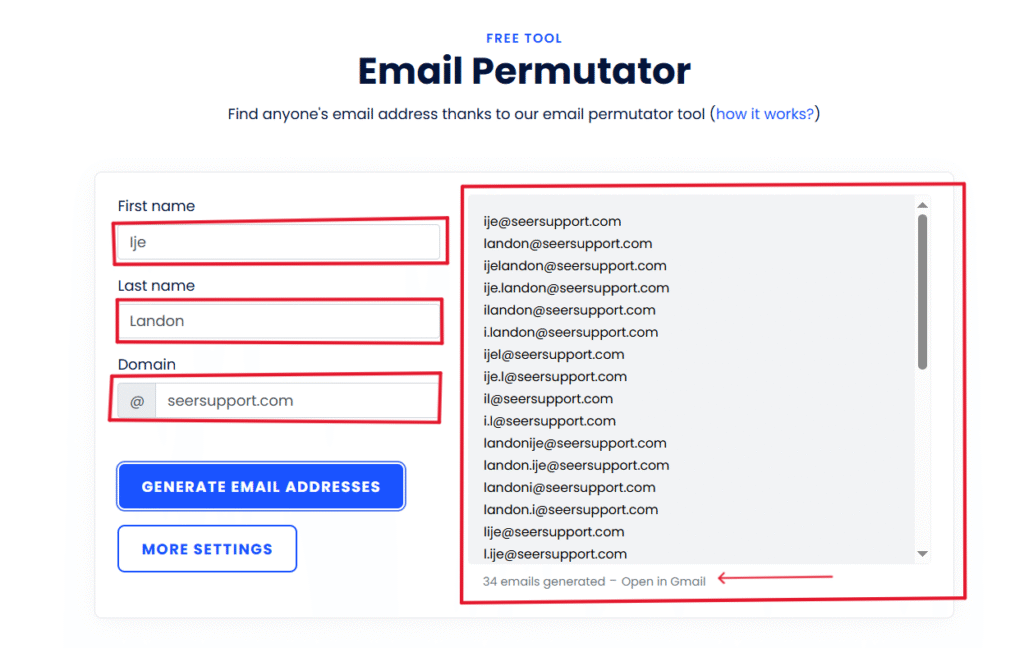
Now, copy the generated email addresses and paste them into the ‘To’ field for the email you intend to send, or simply click Open in Gmail to fill them in automatically.
Related article: 6 Must-Haves To Set Up Before You Start Freelancing
b. Use Gmail to verify the correct address
Once you have the addresses in the ‘TO’ field, you will need to verify the correct email address. Hence, you should look out for any address that comes up with a profile picture.
Typically, corporate businesses and companies require employees to add a photo to their work emails for credibility. So, if an email address comes up with a photo that (most of the time) matches the client’s LinkedIn photo, that is the correct address.
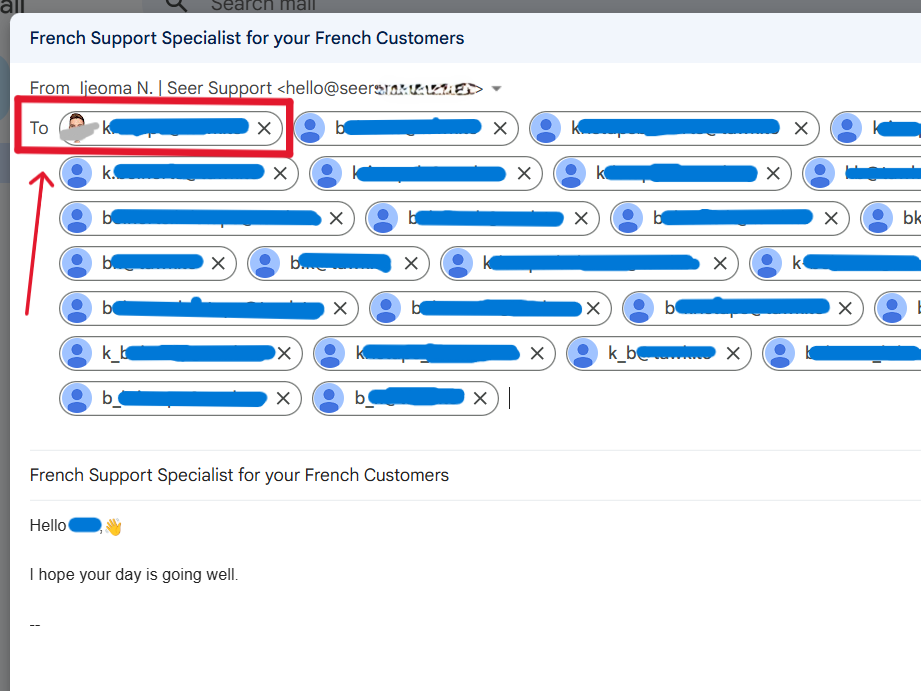
But if you are still unable to verify these addresses in Gmail, you can use an email verification tool. I recommend email verification tools like Hunter.io and ZeroBounce for the best results.
5. Software Marketplaces
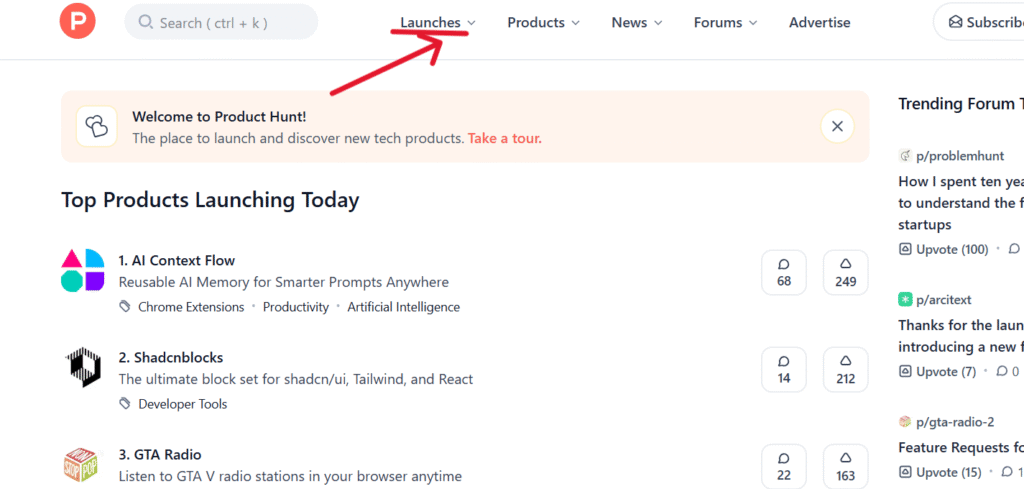
Product Hunt and G2 are typical marketplaces where you can find, review, and look out for new software or tech products in the market. Founders use these platforms for their product launch or to gain visibility for their tech product, but I use these platforms to find my next lead.
To find your next lead, look at the ‘Launches’ (for Product Hunt) or ‘Software’ (for G2) pages and find a tech product that fits your skills. Once you find a tech product, visit their website and find more information about the product.
Related article: Best Freelance Websites in France
For me, I go straight to their LinkedIn page, look out for the founders or anyone in the hiring team, and use Hunter.io to find their emails.
So, software marketplaces are also a great way to find and verify client emails for freelancers and content creators.
6. How To Verify Client Emails
Now that we know how to find client emails, how are you sure that these addresses are valid? I dread those bounce emails from mailer-daemon@google.com because they makes my mailbox look chaotic.
But to make sure that your contact list is clean and updated, here are 6 methods to verify client emails before you send that pitch:
- Look up the domain or address. The simplest and effective way to verify an email address is to look it up on search engine – Google or Bing. Simply type in the email address in the search engine, e.g. ‘hello@seersupport.com’, and Google will display the business or company associated with that address. Try it now!
- Use Gmail. When you type an address in the ‘TO’ field, Google automatically tries to verify the address. If it recognizes the address or if it’s a Google Workspace account, it will auto-complete the address and come up with the associated profile photo. Of course, it may be valid if there is no picture, but it just means that Google has not recognized the address.
- Use Email Verification tools. Email verification tools are automated software that check the syntax, MX records, DNS records, SMTP, etc., of an address to ensure that it is valid and can receive your emails. Tools like ZeroBounce, BookYourData, and Hunter.io can verify your contact list in bulk and identify invalid or outdated email addresses, giving you a clean authentic list.
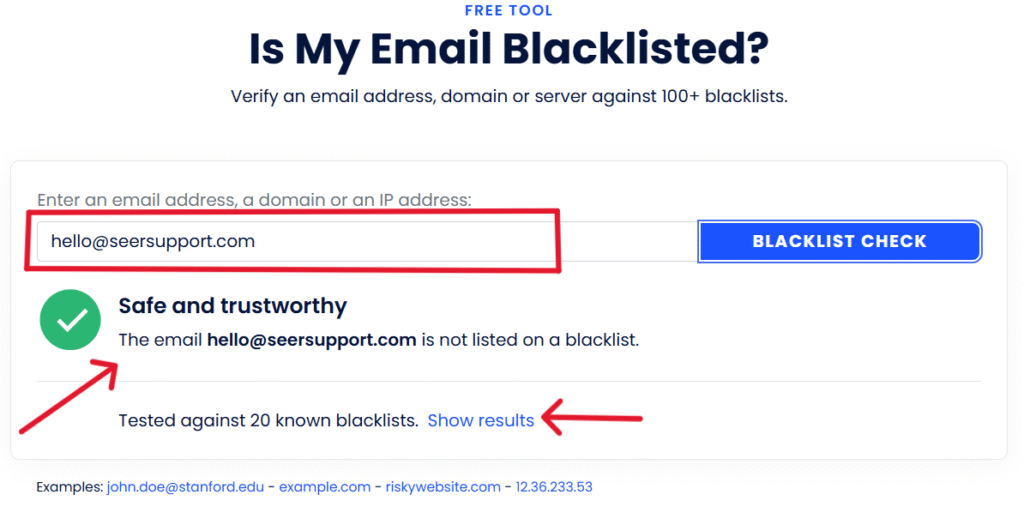
- Check if the domain is redlisted. Sometimes an email address could be valid, but due to its previous activity, the domain may have been marked by ESPs. Free tools like Mailmeteor’s Checker can help you verify if an email address is marked, to avoid damaging your email reputation.
Remember, email validation is not the same as an email verification. Email Validation ensures that the client's email address is properly formatted before you verify it. While Email Verification confirms if a client's email address is valid and can accept your emails.You can also read: How To Create A One-Page Site With Mainstack
In Summary
Having a clean, verified, and updated client list is the first step toward landing your first client. And if your email content is clean, email service providers (Google, Microsoft, etc.) will ensure that your email lands in the inbox, and not the spam folder.
Keep in mind that these are all legal ways to find and verify client emails. As you know, sending unsolicited emails or using an unverified contact list will affect your email reputation and deliverability. So, ensure that your email list is clean and verified before you send that email.
Apart from cold emailing, here are freelance websites you can use to find freelance clients and tips on how to set boundaries with them.
And if your email is personalized and courteous, landing new clients will feel like a walk in the park.





Great information shared.. really enjoyed reading this post thank you author for sharing this post .. appreciated
As a new freelancer, this information was useful.👏
I’m glad that it was useful