
If you send at least 10 cold emails per week, it’s time to save yourself the stress and use a cold email tool. Cold emailing is a great way to get noticed, whether you have a large following or are a new freelancer. On that note, this article is to highlight the top cold email tools for freelancers and creators in this current market.
When I first started freelancing, I didn’t use any tool for my cold emails. I simply sent my emails from the mailbox and hoped they got into the clients’ inboxes. Well, it did – because I got responses.
Later, I tried a few cold email apps, including the free ones. Over time, I found some simple cold email tools that helped me send emails, track them, and sometimes automate email follow-ups without breaking the bank.
I am dedicating this guide to freelancers and content creators who wish to send cold emails the smart way and get results. I will also share my top email outreach tools and software, their features and how to use them for optimal results. With the right tool, you can personalize your emails, track your email analytics, and stay organized.
IN THIS POST:
- Basic features to Look Out for in a Cold Email software
- Top 5 Cold Email Tools For Freelancers & Creators
- How to Use a Cold Email Tool
- Where Should You Store Your Email Contacts?
- FAQs About Cold Emailing Tools
- Conclusion
Before we proceed, you should note that there is a distinction between cold emailing and email marketing.
Cold email = reaching out to people who don't know you. Email marketing = reaching out to people who know you or know about you.Cold emailing involves sending a polite email to someone you don’t know, a prospective client, in the hope that they notice you. They don’t know you, but you are reaching out to see if they are open to hiring you.
Email marketing is reaching out to people who already know about you, with their permission. In this case, you want to maintain communication with them and inform them about your business.
So, for this article, our focus will be on cold emailing apps (not email marketing tools) that can help freelancers, like me, and creators get their emails to the right inbox.
Related article: How to Write Cold Emails That Get Clients: Templates & Tips
Basic Features to Look Out For in a Cold Email Software
Every outreach tool in the marketplace has features that are unique to it. Some tools or apps can find, verify, and store your contacts while sending your emails. Others could verify, store, send your campaigns, and help you track your campaign. Some could also allow users to send a mail merge directly from their spreadsheet.
Each has its own unique features.
Mail merge = the process of sending the same email, but personalised, to many contacts automatically, in one click.But here are a few features that a cold emailing tool must have:
- Mail merge – a good emailing software should enable users to send personalized emails to more than one recipient automatically.
- Personalization – allow users to personalize their emails (content + subject).
- Attachments – allow users to add personalized attachments in acceptable formats.
- Follow-ups – automatically create sequences to send multiple follow-ups based on a schedule.
- Integration – with a CRM tool, email service providers, or other apps.
- Templates – let users use, create, and manage email templates.
- Email scheduling – users can schedule their messages to send at a later date or time.
- Bounce protection – protects users from a bounced message.
- Verification – users can verify the validity of their contacts before launching a campaign.
- Tracking – opens, clicks, responses, or other analytics relating to the campaign can be tracked from the dashboard.
And the list goes on.
These features may be available in free or paid plans, but a good cold emailing software should have at least five of these features.
Top 5 Cold Email Tools for Freelancers and Creators
I have tried several outreach tools over the past two years, but these five stuck with me. I alternate them based on my needs, but here are the tools I recommend for freelancers and creators:
1. Hunter.io
Hunter was the first cold emailing tool I used. I started using it as an email verification tool and later as an emailing tool. This tool saves time and offers many features in one place, including a lead prospecting feature. As a freelancer and creator, Hunter.io has been my go-to tool for campaigns.
Hunter offers free, limited credits to free users, which is perfect for new freelancers and creators who need simple features. Although most advanced features are available on a paid plan, you can enjoy a plethora of features with free credits and upgrade as your business grows.
Features: Email verification, email finder, discover leads, integrations, mail merge, and custom domain tracking.
Best for: New freelancers and creators with limited experience in cold emailing at minimal cost.
Related article: How to Find Freelance Clients Fast
2. Gmass
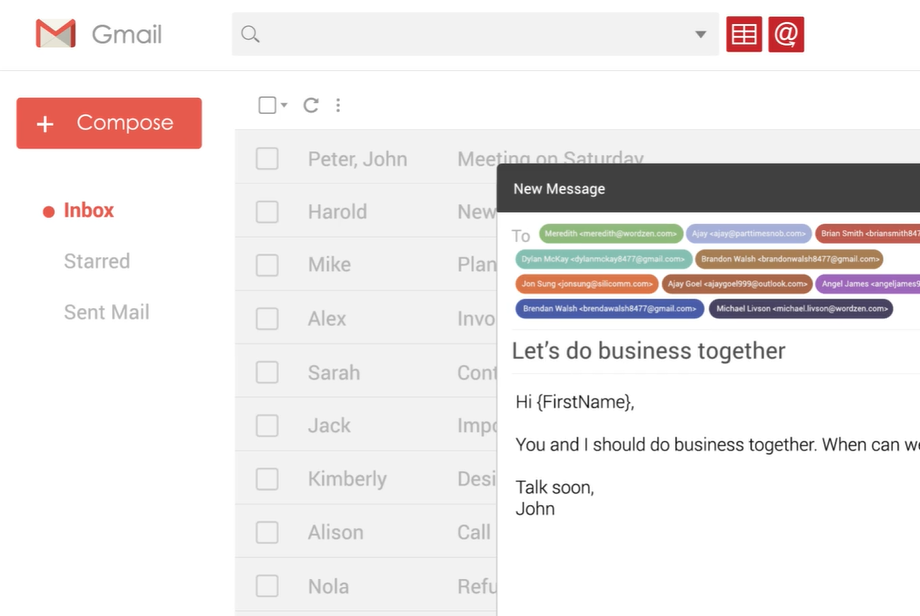
The Gmass tool has been one of the top cold email tools for freelancers and creators because of its simplicity. It integrates seamlessly with Gmail, making my emailing processes easier and faster.
Depending on your plan, you can create follow-ups, merge the tool with your Google Sheet, and even segment your campaigns.
Features: a Chrome extension, bounce detection, segmentation, A/B test, personalization, team accounts.
Best for: Freelancers or creators who want to stick with Gmail without leaving their mailbox
3. Lemlist
I started using Lemlist at the recommendation of a freelancer, and it has become a staple for my outreach. I find that the tool may look similar to Saleshandy, but its workflow differs. Beyond emailing, Lemlist offers integrations with LinkedIn (for prospecting) and cold call features.
Features: Cold emailing, cold calling, LinkedIn integration, phone integration, AI features.
Best for: Experienced freelancers or creators who wish to set up multiple workflows or automations for their tasks.
4. Mixmax
At first, Mixmax felt like an email/CRM tool that resembled HubSpot. The tool allows you to send, track, and categorize your inbox depending on your plan.
If you are like me and wish to keep your outreach within your Google mailbox, Mixmax will be a great start. It integrates seamlessly with Gmail and automatically sorts your emails into categories.
Although some of its automation features are on paid plans, Mimax offer tracked emails to free users.
Features: Reminders, scheduling, templates, email tracking, CRM integration
Best for: New freelancers or creators who wish to stay within Gmail and use simple automations.
5. Mailmeteor
One of my personal favourites because of its simplicity. You don’t always need to import your contact list to the dashboard for a campaign. I start my mail merge directly from my selected spreadsheet using the Chrome extension and monitor the live tracking from the same Sheet.
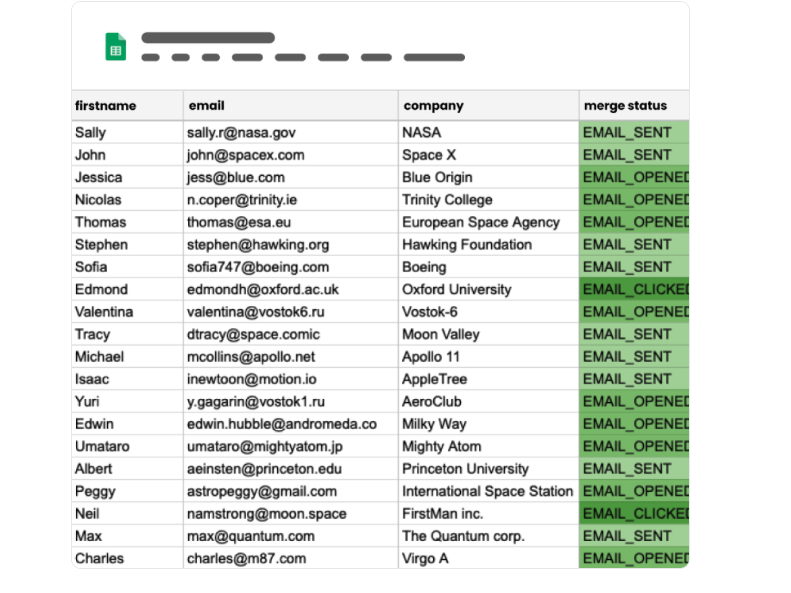
While most tools are designed to appeal to marketers or look salesy, Mailmeteor’s features are simple to use for first-timer users. It offers a 50 daily email quota to free users and up to 1500 daily email quota to other paid tiers.
The tool integrates with Google and Microsoft accounts to send emails, and Mailmeteor offers four-tier plans and unique features to its users.
Features: Live tracking, email warmup, email verification, bounce detection, CRM integration.
Best for: Freelancers and creators looking for an intuitive mail merge tool that can be used from Google Sheets, Gmail, or Excel.
Cold emailing tool = verify + send + track + follow-upHow to Use a Cold Email Tool
It is essential to note that the objective of the cold email tool for freelancers and creators is to help you send better emails and track your results.
It’s okay to send your emails from your mailbox, but we know that features like personalizations and automatic follow-ups are not available in your mailbox.
Before using an outreach tool, I believe that your email list is compiled, organized, verified, and ready to use. If not, please consult my guide on how to find and verify client emails.
Related post: How to Find and Verify Client Emails – Freelancers & Creators
Now that the first part is settled, the first step to using a cold email tool is to sign up on their web app or website. An email address is required for this, so ensure that you sign up with the same address you wish to use for your campaigns.
Next, draft your template to ensure it aligns with Google’s sender guidelines. You can save your templates on your computer or the email tool.
Next, personalize your email with a mail merge tool. If the tool offers mail merge features, use it. Alternatively, you can add variables to your columns in a spreadsheet to help you personalize your campaigns. Just like I did below:
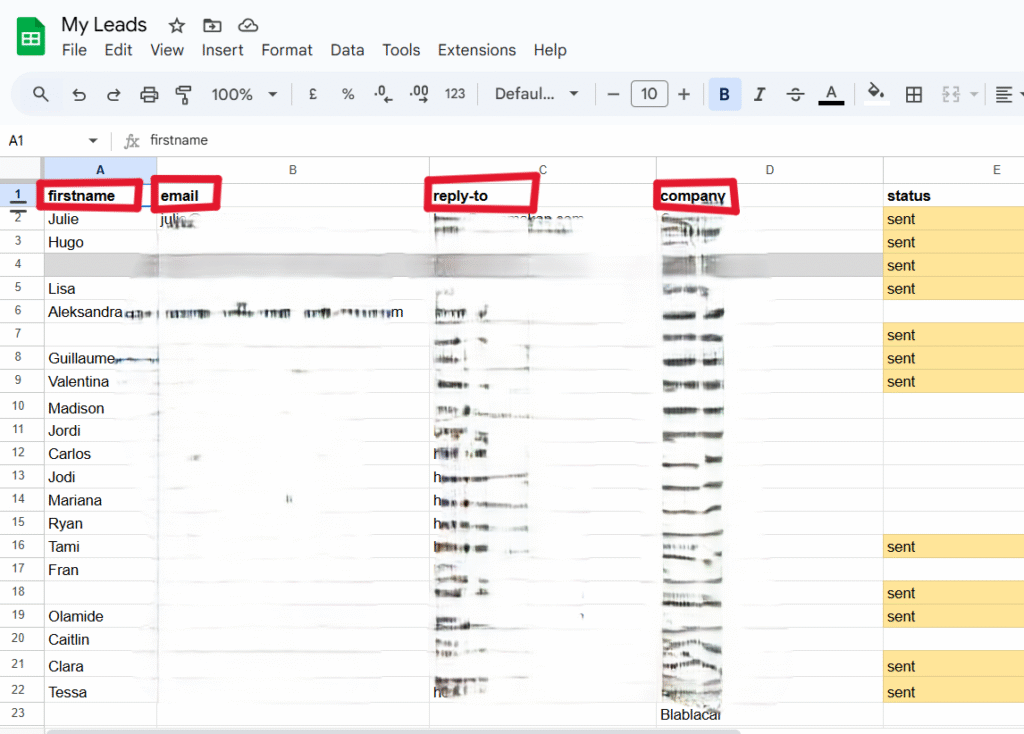
On your preferred tool, create your campaign with your template and fill in the necessary variables for personalization. Preview your email to ensure everything is correct, add any follow-ups, and schedule or send it.
From here, you can also track your emails and organize your CRM in a CRM tool.
Where Should You Store Your Email Contacts?
Wherever you want. I’m kidding!
If you know how to find and verify client emails, you will need a place to store this information, as well as any other information relevant to your prospective clients.
You also need a place to store your clients’ information and keep track of your conversations – follow-ups, responses, and whether you have contacted them already. This way, you are sure not to contact the same client twice.
I store my recipients’ information in a Google Sheet. With a simple Google Sheet, I can compile all the necessary information about my prospective clients. This way, I have enough data about the client before sending a message.
My friend uses MixMax to store and manage her contacts while sending emails from the same software. CRM tools, such as HubSpot, are excellent tools for storing your contacts.
For my templates, I use Google Docs to organize and store my email templates for each client segment (I work with start-ups and e-commerce businesses).
Also read: 12+ Hard Truths About Freelancing
FAQs About Cold Email Tools
Yes, if the tool is reputable. Hunter.io offers free credits to free users, while I use Mailmeteor’s Free plan for my campaigns. While they are safe to use and good for small email campaigns, some of them might have limited features.
It could, but it depends on your email content and service provider. If you are using a free Gmail address, you are limited to 500 emails per day. However, this number will be lower if your email content is spammy.
On the other hand, big companies can use multiple mailboxes per domain to send up to 2,000 emails per day.
It depends! Some cold email tools offer free credits to daily limits for users on their Free plan. But remember to stay within the email limits set by your email service provider.
Yes, if they allow it! Automatic follow-up is typically a paid feature for cold emailing tools, so if they offer it for free, use it. Also, some cold outreach tools offer one free follow-up.
Follow-ups are essential for freelancers and content creators who wish to land a client, as they help to keep the conversation going.
No, they won’t! A bulk part of your email deliverability depends on you – your email behaviour. As long as you warm up your email, avoid spammy content, and avoid mass campaigns, your emails will be in the inbox.
Sure, you can. Some email apps allow users to integrate their CRM dashboard with their preferred cold email software with a BCC address. With a CRM tool, you can manage, arrange, and keep your business organised.
But if you are starting, a simple, organised spreadsheet can help you organise your cold email process.
While cold emailing tools are designed to make sure your emails land in the right folder, your recipient’s email service provider determines if your email ends up in spam or the inbox.
Also read: Freelancing tips for freelancers
To Conclude
If you followed my previous articles on how to find and verify freelance client emails and how to write cold emails that will help you land clients, you should now understand that cold emailing is not that complicated.
The right cold email tool can help you reach your prospective clients and land more brand deals as a content creator. With the right tools, you can track your recipient’s behaviour and make yourself look professional.
Try two tools at a time, compare them, and choose one that fits your current needs. From my experience, it is better to let the tools do the heavy lifting while you focus on growing your business. With consistent outreach, these tools can help you grow your career in the creative and freelance spaces.
What’s your preferred cold emailing tool?